Back to the “Advanced upload” in admin manual
Example 6 - Map with glyphs#
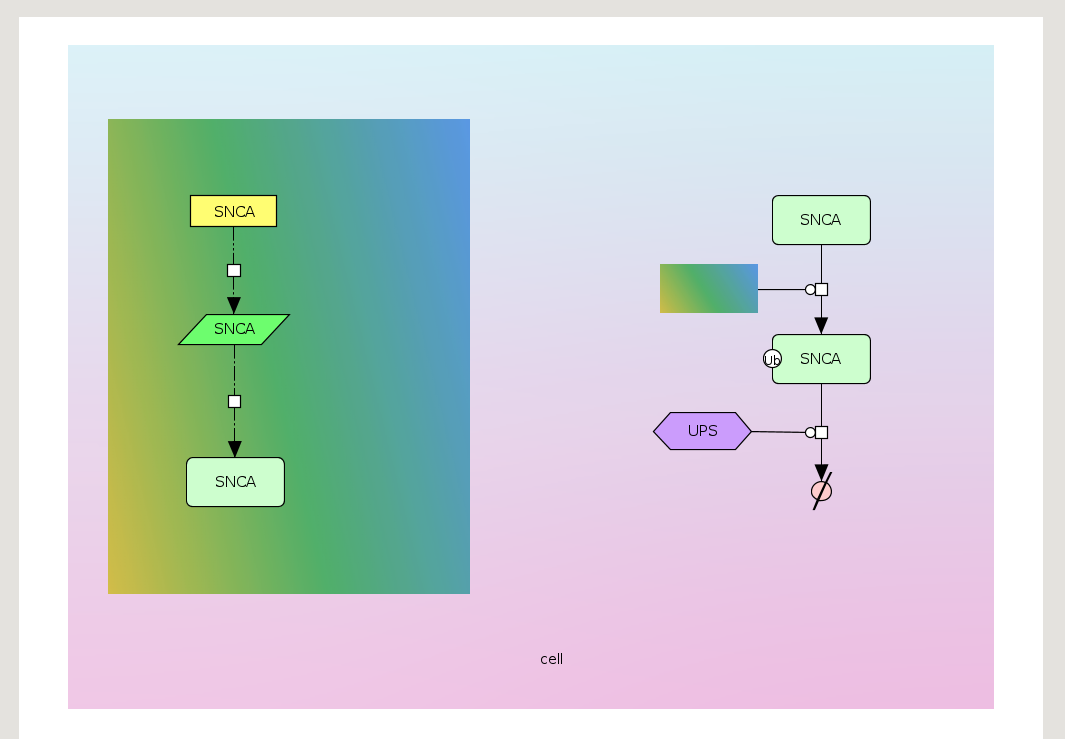
Glyphs allows to colour species, compartments or pathways with user’s provided images. The extension of the images have to be PNG and the files have to be inside directory named glyphs. The images are assigned to the elements by term: Glyph: glyphs/image-name.png
Download the example of the map coloured with glyphs and upload it to the MINERVA Platform. That file is an archive, which contains:
- two images in the glyphs directory,
- the CellDesigner map
Glyphs can be used both to colour submap and main map (if a project is advanced).
See below the properties of the glyphs map:
- Compartment cell
- is coloured by glyph g1.
- has SemanticZoomLevelTransparency: 0.
- has Z-Index: -2, here it is at the bottom of the map.
- Pathway SNCA translation
- and protein PRKN are coloured by glyph g2.
- has SemanticZoomLevelTransparency: 1.
- has Z-Index: -1. It is in front of the compartment cell, but as Z-Index is negative value, what makes the elements and reactions displayed in front of it.
Note For elements and reactions which are not assigned with Z-Index, MINERVA by default give them positive values so they have to be at the front of the compartment.